Frequently asked questions
Plain answers about what the calculator models, what it assumes, and where your numbers go — each checked against the engine’s own code and tests. For the mechanics in order, see how the forecast works; for the numbers in practice, the sample forecasts.
What it does
What does this calculator actually model?
It projects an investment balance forward one year at a time over a horizon you choose. Each year is in one of two phases: accumulation, when your recurring contribution is added and nothing is taken out, and — optionally, from a year you pick — drawdown (the engine calls it distribution), when contributions stop and a withdrawal rule you set is applied instead. Growth is compounded monthly inside each year and reported at year end.
The result is a year-by-year schedule of contributions, withdrawals, growth and ending balance, a chart of it, and a short verdict about what happens by the end of the horizon. If withdrawals outrun growth the balance goes negative and the projection continues from there, so a plan that fails shows how it fails rather than stopping at zero.
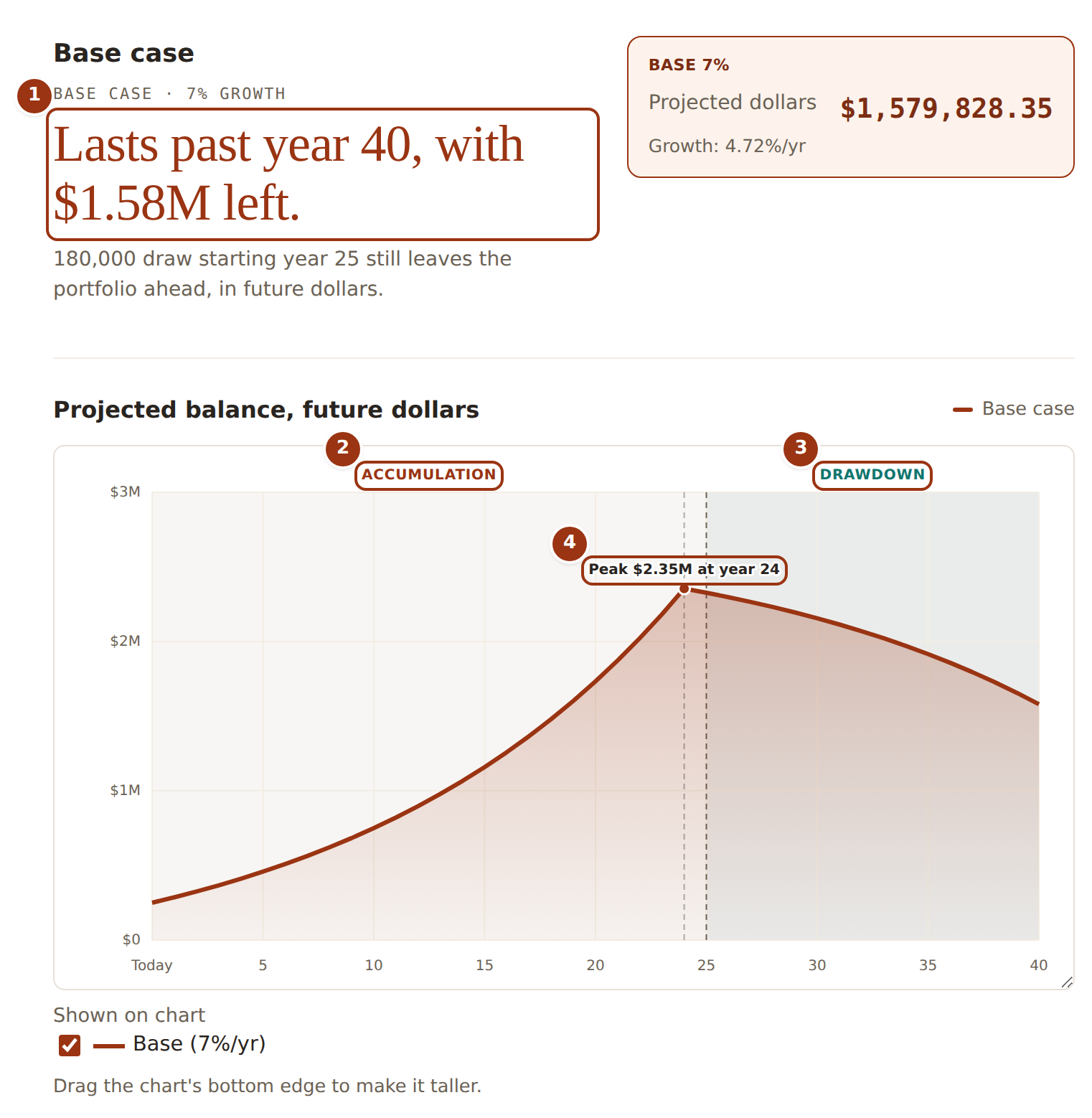
- The verdict: one sentence about how the plan ends, with the final balance.
- The accumulation phase — contributions go in, nothing comes out, and the balance climbs.
- The drawdown phase, from the year you choose — contributions stop and the withdrawal rule applies.
- The peak balance, labelled with its year. Here withdrawals outrun growth from then on; had they not, the line would keep rising.
What are the Bear, Base and Bull scenarios?
Three growth-rate assumptions run over exactly the same inputs. Base is the annual rate you expect; Bear and Bull are a number of percentage points below and above it that you also choose. The calculator runs the whole forecast once per rate, changing nothing else, and shades the range between Bear and Bull on the chart.
They are assumption bands, not predictions and not probabilities. Each is a constant rate applied every year — there is no randomness, no sequence of good and bad years, and no likelihood attached to any of the three. This is not a Monte Carlo simulation; it answers “what if growth averaged this much every year” for three values of “this much”.
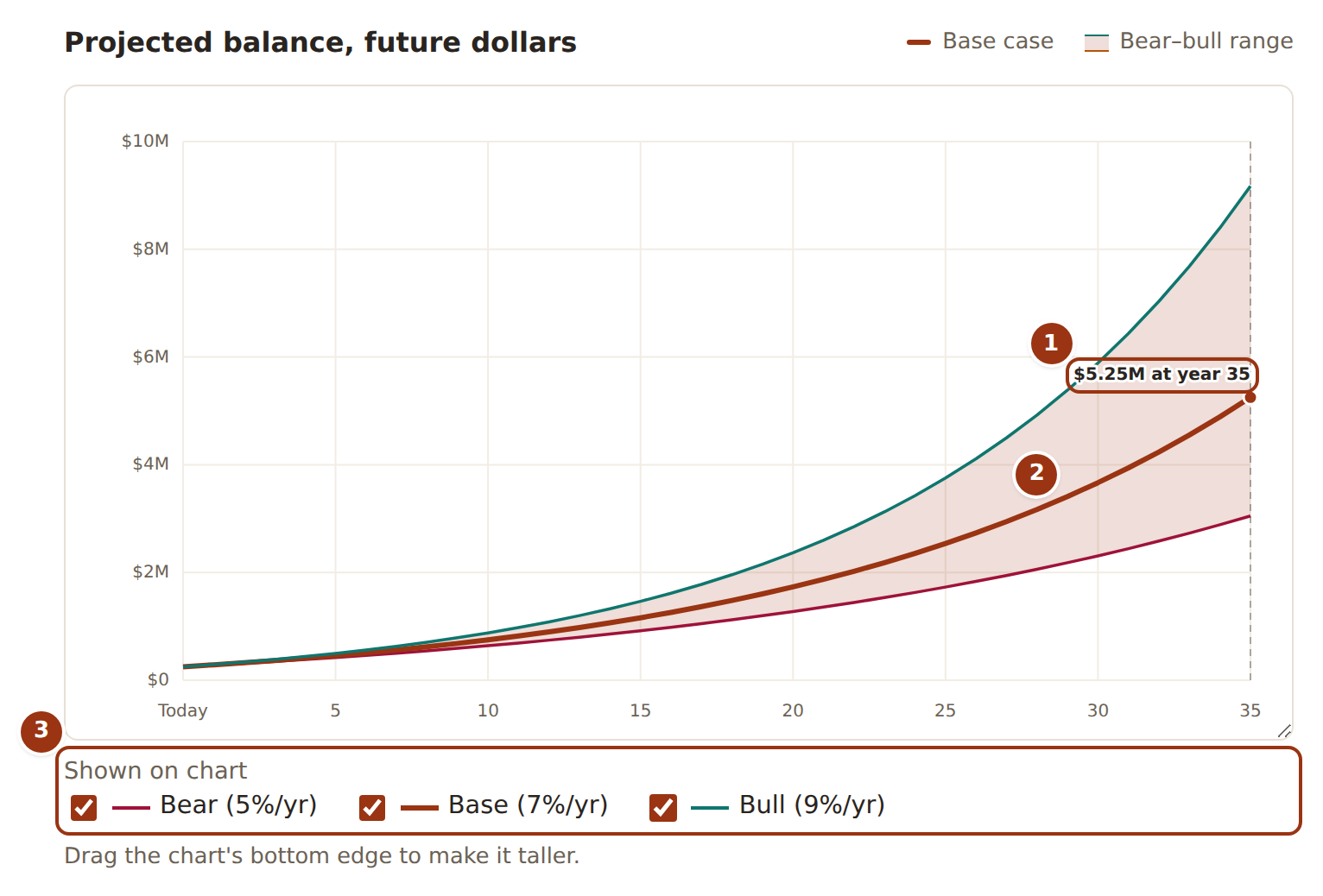
- The Base line, drawn at the growth rate you entered, with its ending balance labelled.
- The shaded band between the Bear and Bull lines — the same inputs at the lower and higher rates. It is a range of assumptions, not a probability.
- Each line can be hidden or shown; the rates in the labels are Base minus and plus the points you set.
What does “inflation-adjusted” or “in today’s dollars” mean here?
The forecast itself is always in nominal dollars — the actual figures the account would show in each future year. If you enter an inflation rate, each year’s ending balance is additionally reported in real terms: divided by (1 + inflation) raised to the number of years, which restates it in today’s purchasing power. A $3,000,000 balance 25 years out is roughly $1,430,000 in today’s dollars at 3% inflation.
The real figures sit alongside the nominal ones; nothing in the projection changes. The one place the inflation rate feeds the projection itself is a home’s property tax, insurance and upkeep, which rise with it (see the housing question below).
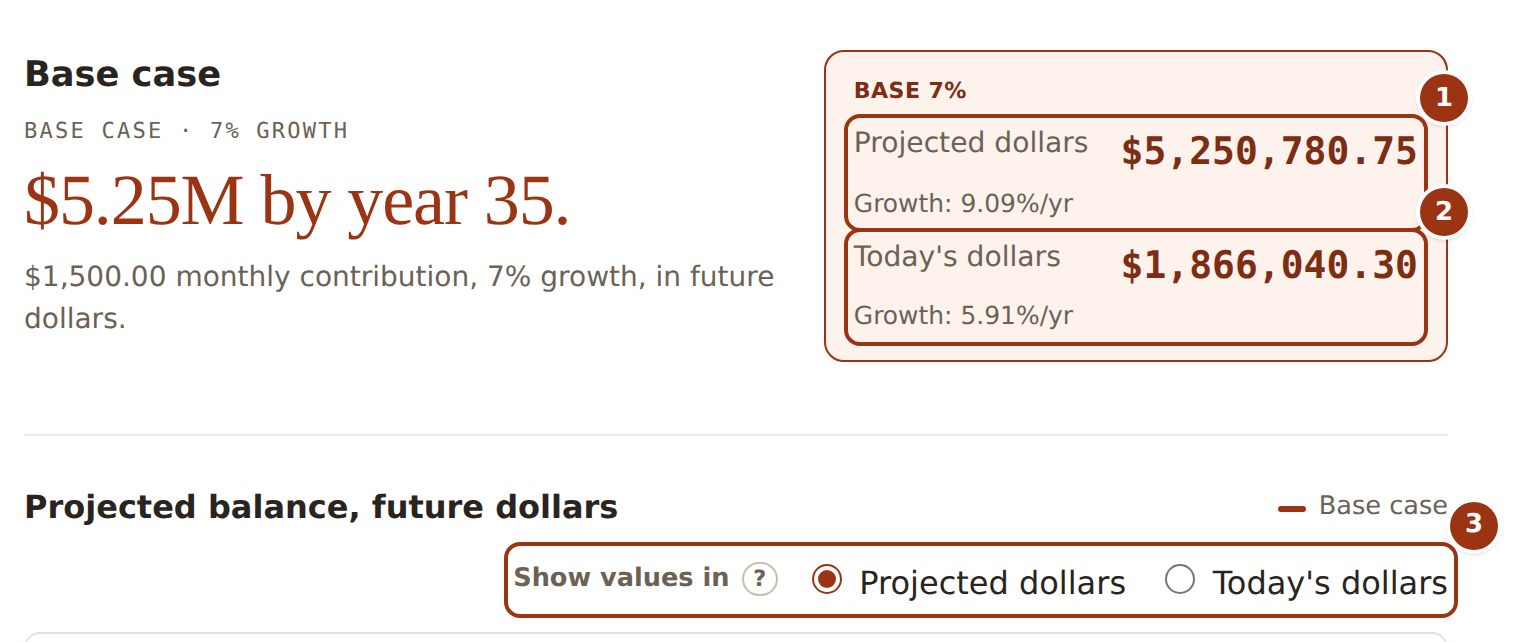
- Projected dollars — the nominal balance, the figure the account would actually show in the final year.
- Today’s dollars — the same balance deflated by your inflation rate, i.e. in today’s purchasing power. It only appears once an inflation rate is entered.
- Switches the chart (and the sensitivity panel) between the two; the projection underneath does not change.
How does target net worth detection work?
If you set a target, the calculator scans the Base-case schedule and reports the first year whose ending investable balance is at or above it — or tells you it is never reached within the horizon. It is a plain read of the schedule, not a solver: it will not compute how much you would need to save to hit the target on a given date. Because results update as you type, the practical way to answer that is to change a contribution or the growth rate and watch the year move.
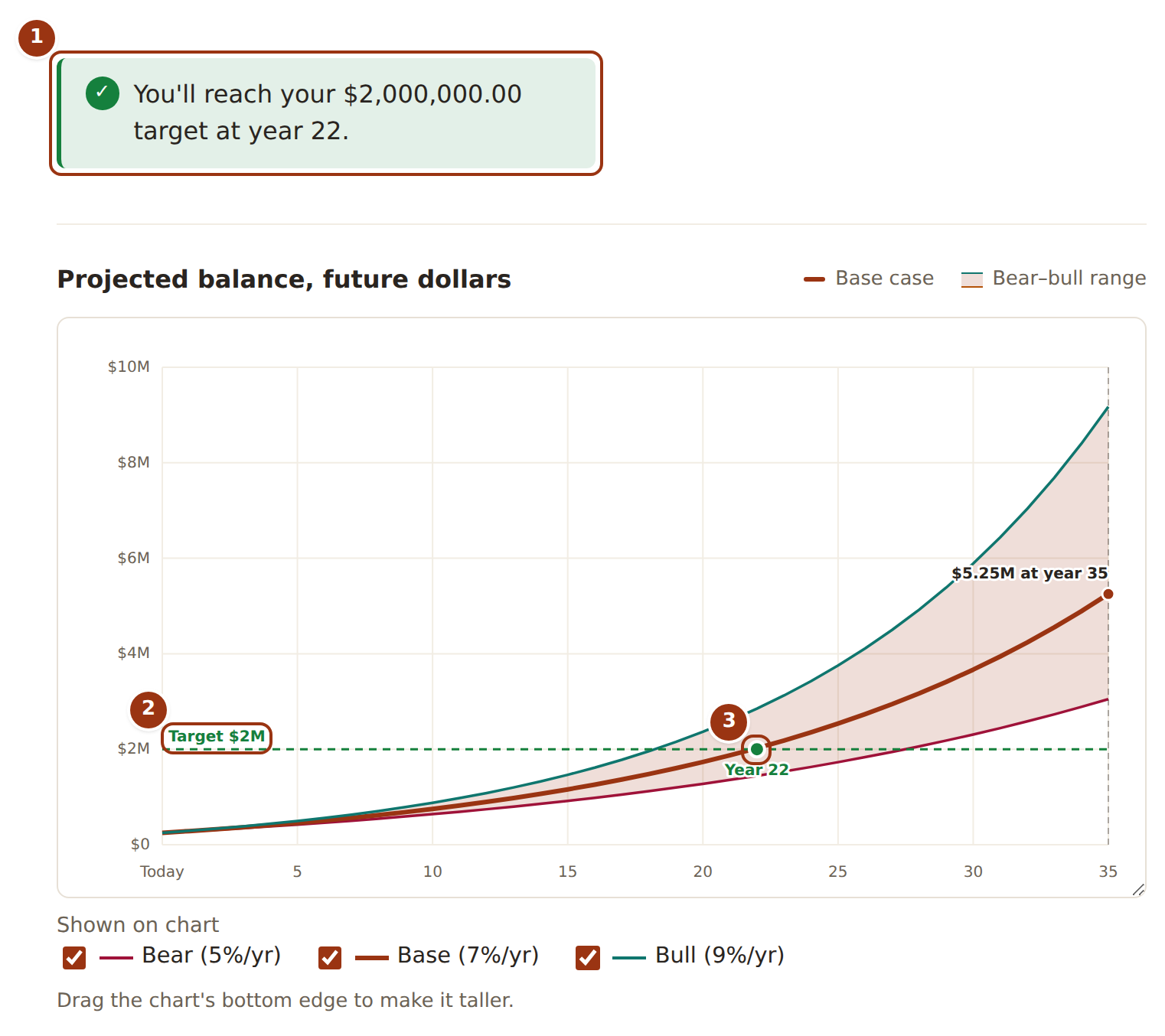
- The answer in words: the first Base-case year whose ending balance is at or above the target — or that it is never reached.
- The target itself, drawn as a dashed line across the chart.
- The crossing point, the year the callout names. Change a contribution or the growth rate and watch it move.
What is the sensitivity panel showing me?
How much the ending balance depends on the growth assumption. It states the swing from the Bear rate to the Bull rate in percentage points and the difference that swing makes to the final balance, and draws one bar per scenario so the three endings can be compared at a glance. It uses the same final values as the chart above it — nominal or in today’s dollars, whichever the chart is currently showing. A wide spread means your plan’s outcome is mostly a bet on the rate; a narrow one means contributions and withdrawals dominate.
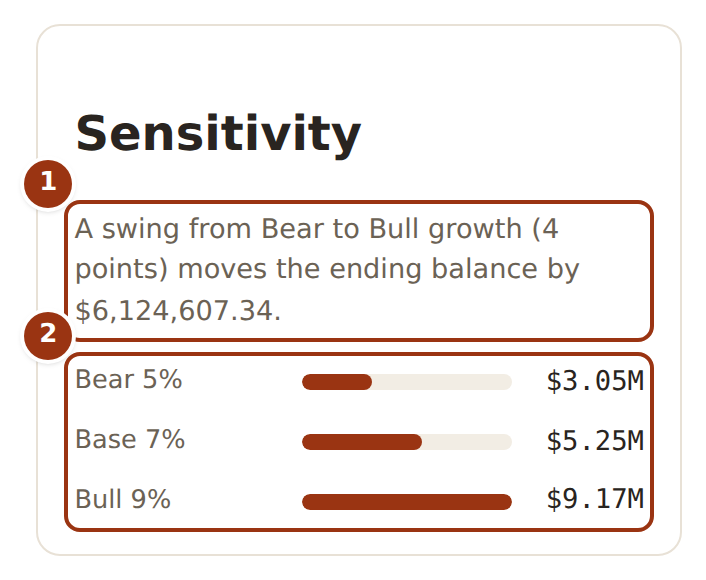
- The swing in one sentence: the gap between the Bear and Bull rates, and the difference it makes to the final balance.
- One bar per scenario, scaled to the same axis, so the spread is visible at a glance. The bars use whichever basis the chart is showing.
Accounts and taxes
Which account types are supported?
A pooled taxable portfolio (the “current net worth” and “recurring contribution” fields) plus any number of pre-tax 401(k), Roth 401(k), Traditional IRA and Roth IRA accounts, each with its own starting balance, its own contribution, optionally its own growth offset from the scenario rate, and its own tax treatment on withdrawal. The projection runs per account, and every portfolio-wide number is the exact sum of the accounts.
As far as the maths is concerned there are only three kinds: taxable (the pooled portfolio), tax-deferred — money that goes in untaxed and is taxed when withdrawn, i.e. a pre-tax 401(k) or Traditional IRA — and tax-free, a Roth 401(k) or Roth IRA, which is never taxed on the way out. A pre-tax 401(k) and a Traditional IRA behave identically; what separates them is the label, the default withdrawal order, and that only the 401(k) can carry an employer match.
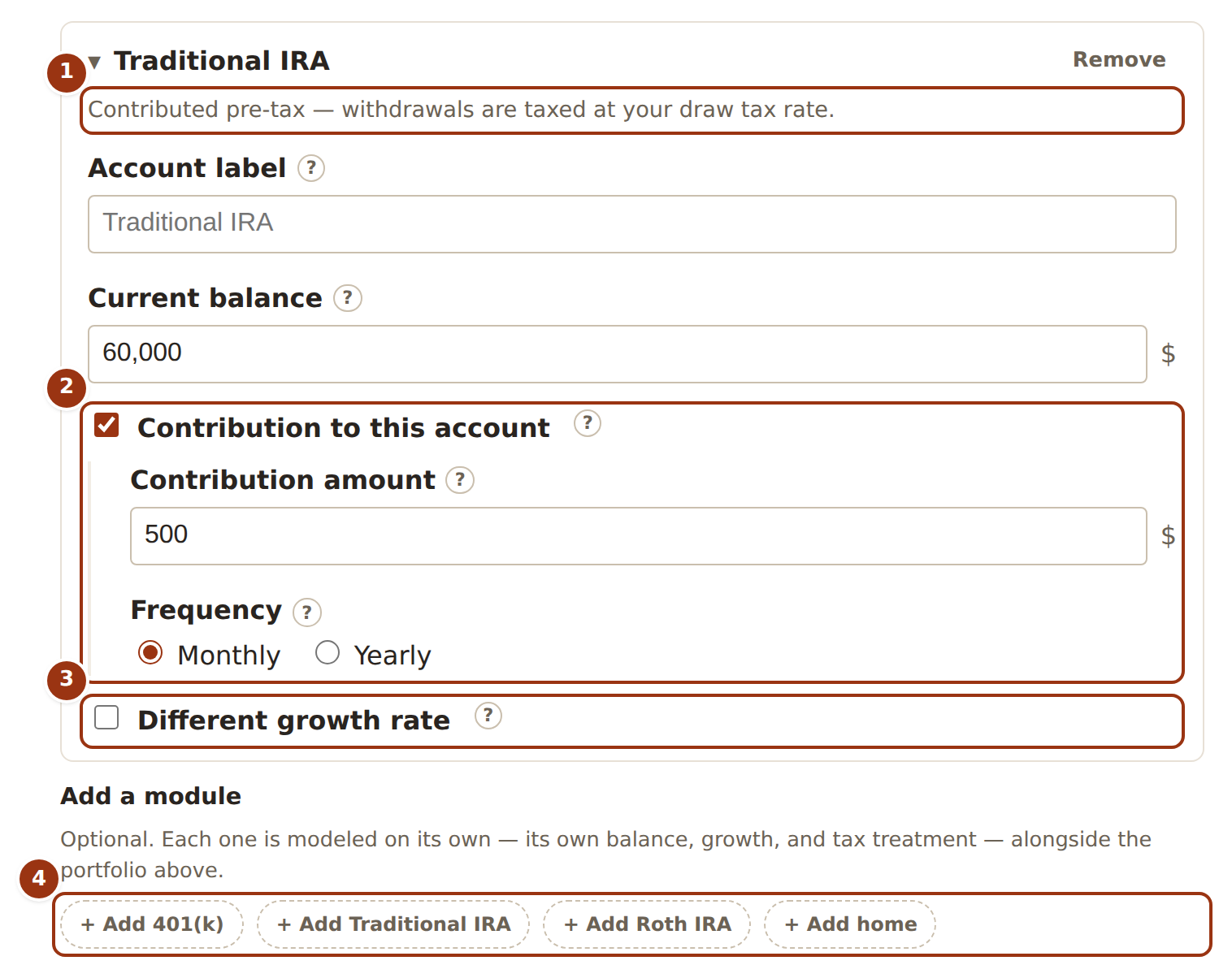
- Each account is a card of its own. The description states its tax treatment — this one is tax-deferred, so its withdrawals are taxed.
- Its own contribution, separate from the pooled portfolio’s, with its own frequency.
- Optionally its own growth rate, expressed as points above or below the scenario rate so it still moves with Bear, Base and Bull.
- Add as many accounts as you hold; one home at most.
In what order are accounts drawn down?
By default taxable first, then tax-deferred, then tax-free, so the Roth accounts keep compounding untaxed for as long as possible. A year’s withdrawal is taken from the first account in that order until it is empty, then the next, and so on. Balances are never clamped at zero: if the whole portfolio cannot cover the draw, the last account goes negative rather than the withdrawal being quietly reduced.
Underneath, each account carries a withdrawal-order number and the engine drains them in ascending order, with ties falling back to the taxable → tax-deferred → tax-free convention. The form does not yet expose that number, so on this site the order is always the default one.
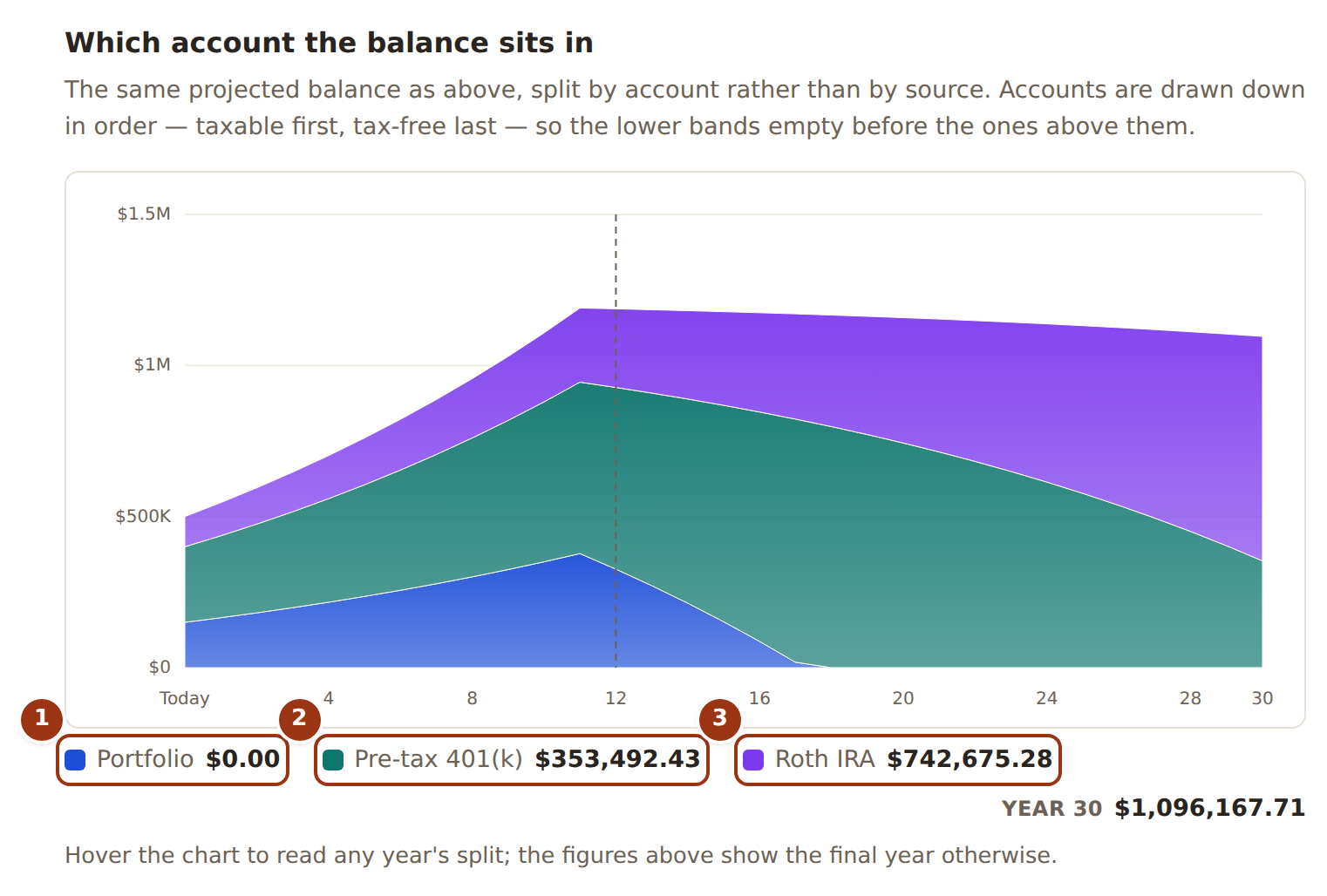
- The taxable portfolio, at the bottom, is drawn from first — its band empties before anything above it is touched.
- The tax-deferred 401(k) starts shrinking only once the portfolio is gone.
- The Roth IRA, drawn last, keeps compounding untaxed for as long as the others last.
How are taxes handled?
With one flat rate, and only on withdrawals. If you enter a tax rate, every dollar withdrawn from a taxable or tax-deferred account in a drawdown year is taxed at that rate, and the schedule shows the gross draw, the tax, and the net amount you can actually spend. Withdrawals from tax-free accounts are never taxed, whatever the rate.
That is the whole tax model, and it is worth being precise about what it leaves out: there are no income-tax brackets, no capital-gains treatment, no state tax, no required minimum distributions, no early-withdrawal penalties, no contribution limits, and no deduction for pre-tax contributions on the way in. Treat the rate as your best guess at an effective rate on retirement withdrawals, not as a tax return.
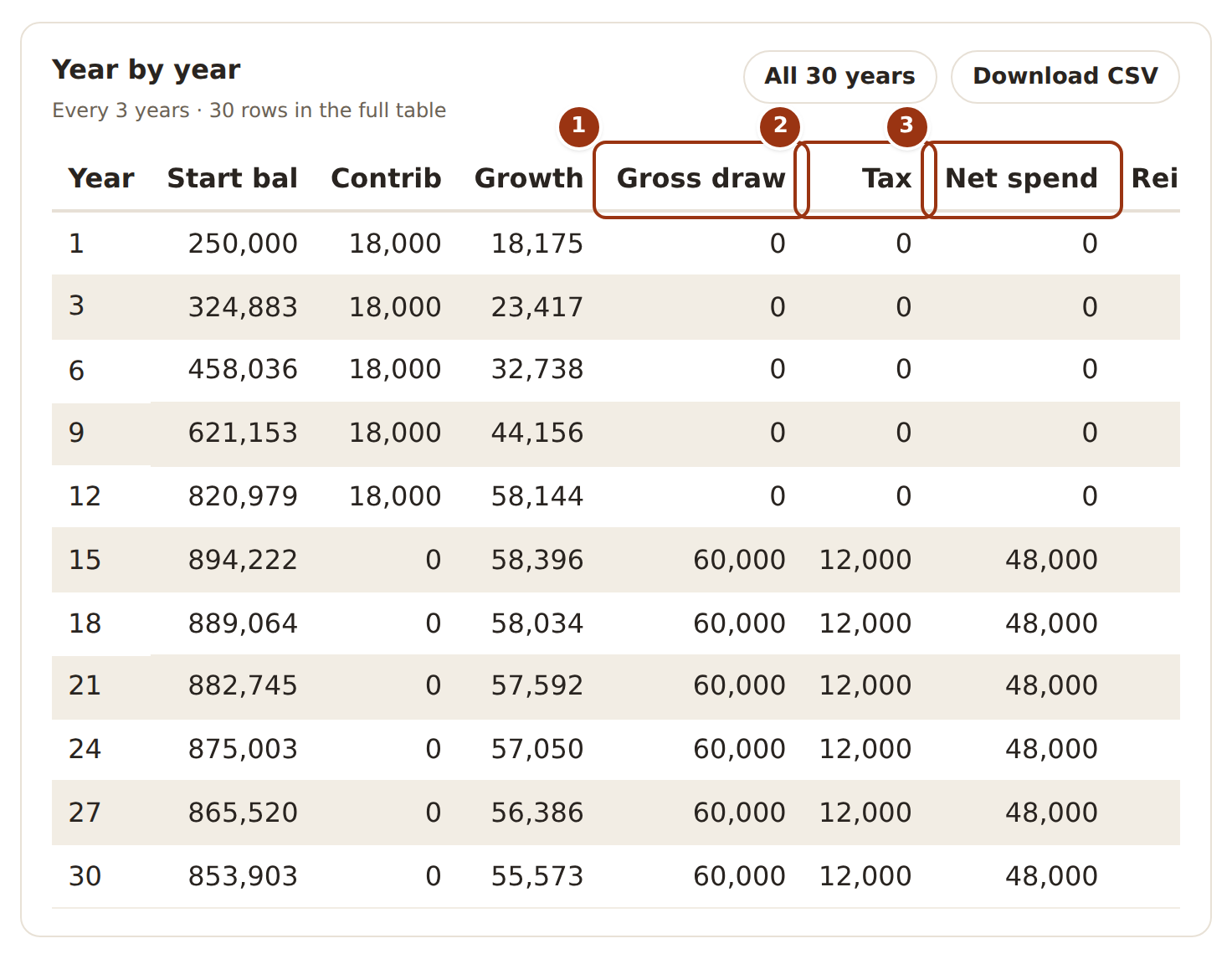
- Gross draw — the amount taken out of the accounts that year, before tax.
- Tax — the flat rate applied to whatever came out of taxable and tax-deferred accounts. Withdrawals from Roth accounts contribute nothing here.
- Net spend — what is left to live on: gross draw minus tax.
How does employer matching work?
A 401(k) can carry a match described the way plans describe it: the employer adds some percentage of each dollar you contribute (50%, say), on contributions up to some percentage of your salary (the first 6%, say). The match is worked out monthly — one twelfth of the salary sets that month’s cap — and deposited in the same month as the contribution that earned it, so matched dollars earn exactly the growth your own do. It is reported separately from your contributions so the two stay distinguishable.
Two things to know. It only does anything if you also enter a salary, since the cap is a percentage of salary; the salary is used for nothing else and is never treated as money flowing into the portfolio. And a contribution entered as a single yearly lump earns only one month’s worth of match, exactly as it would at a real plan with no true-up — front-loading a 401(k) can cost most of the year’s match, and the forecast shows that rather than hiding it.
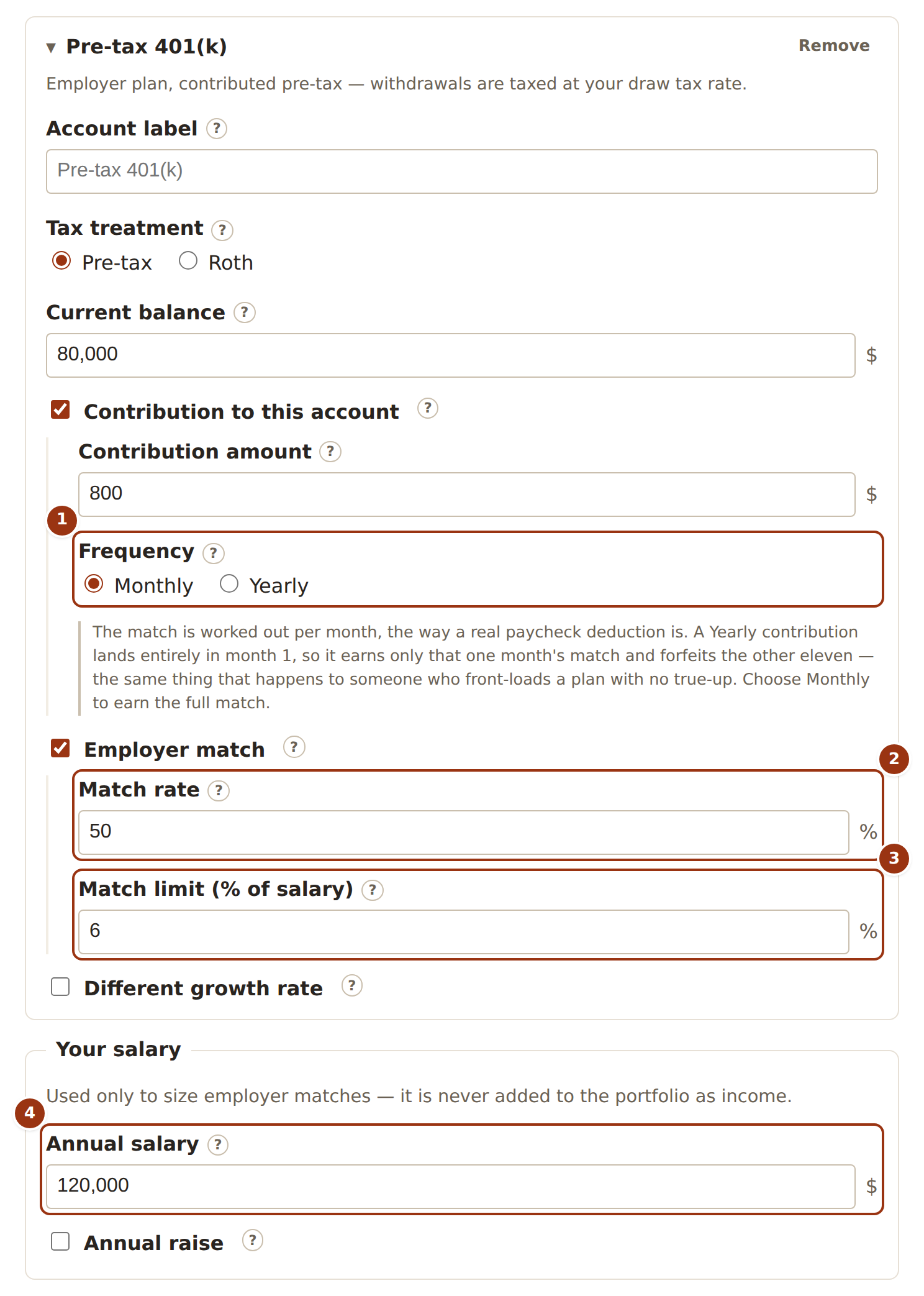
- Frequency matters: the match is worked out per month, so a Yearly contribution earns only one month’s match.
- Match rate — cents the employer adds per dollar you contribute (50 means 50%).
- Match limit — the share of salary up to which contributions are matched (the “first 6%”).
- Your salary sizes the limit and does nothing else; without it the match earns nothing.
Contributions and cash flows
Can contributions grow over time?
Yes. A contribution can step up by a fixed dollar amount each year or by a percentage each year; the first year of the contribution uses the amount as entered and the increase applies from the second year on. Either can also be negative to model a contribution that winds down, floored at zero — a contribution never turns into a withdrawal.
A contribution can also be limited to a window of years: start it in a later year, or stop it before the drawdown begins, and the escalation is counted from the window’s own first year.
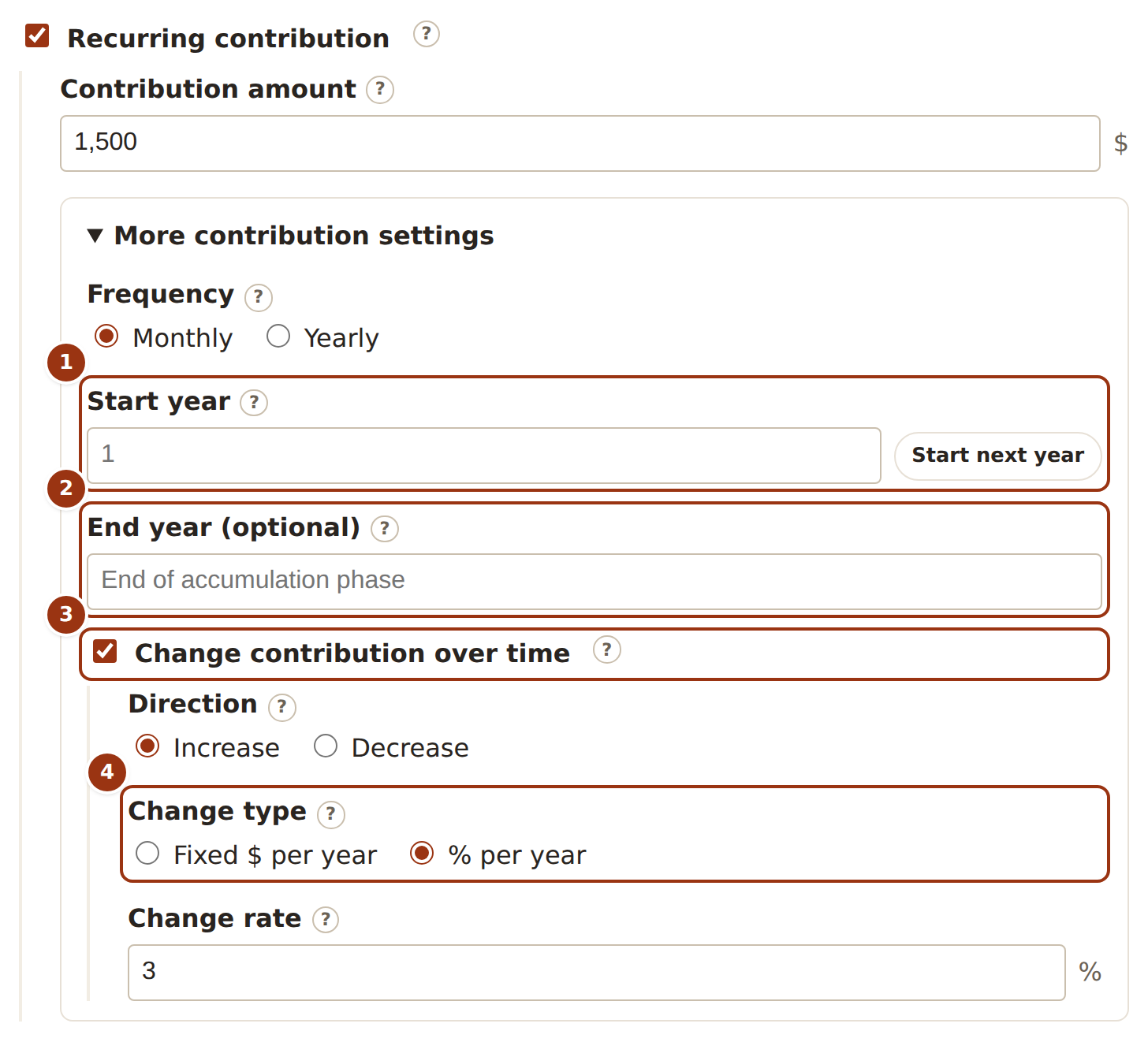
- Start year — leave it at 1 or delay the contribution to a later year.
- End year — blank means it runs until the drawdown begins; set it to stop sooner.
- Turn on a yearly change; Decrease winds a contribution down, floored at zero.
- Fixed $ per year adds the same amount each year; % per year compounds. Either applies from the second year of the contribution’s window.
What are one-off flows?
A single deposit or withdrawal in one named year — an inheritance, a car, a wedding, a tuition bill — on top of the recurring contribution and withdrawal streams. It is applied before that year’s growth compounds, so a deposit earns a full year of growth and a withdrawal shrinks the base that would have grown. A withdrawal can be targeted at one specific account (and comes entirely out of it, even past zero) or left portfolio-wide, in which case it follows the normal withdrawal order; a portfolio-wide deposit is split across accounts in proportion to their balances.
Each flow has a basis, and the distinction matters. Today’s dollars means “this much in today’s money”: the amount is inflated by your inflation rate up to the year it lands, so $50,000 of tuition entered for year 18 becomes a larger nominal figure by then. Projected dollars means the amount is already the nominal figure for that year and is used as-is. If you have not entered an inflation rate the two are the same.
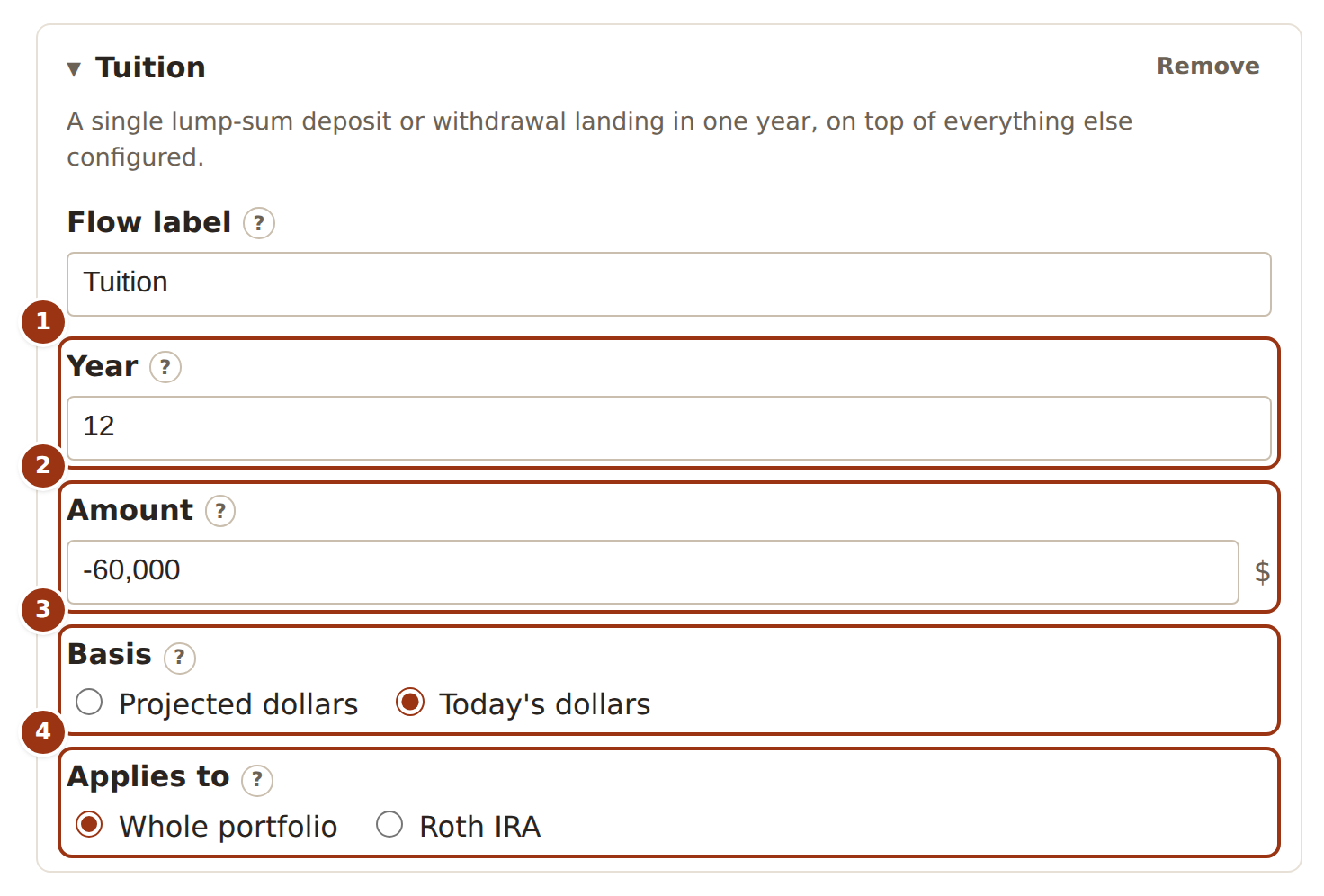
- The single year the flow lands in.
- The amount: positive is a deposit, negative a withdrawal. It is applied before that year’s growth.
- The basis. Today’s dollars is inflated to that year by your inflation rate; Projected dollars is used as entered.
- Whole portfolio follows the normal withdrawal order (or splits a deposit by balance); one account confines the flow to it, even past zero.
How do withdrawals work — fixed amount or percentage?
Either. A fixed amount withdraws the same dollar figure each drawdown year, optionally rising by an inflation rate from the second drawdown year on; this is the “I need $60,000 a year” plan, and it can run the balance dry. A percentage of balance withdraws that share of whatever the balance is at the time — the “4% rule” — so the income falls after a bad year and rises after a good one and the balance can never reach zero, but the income is not level.
You also choose whether each year’s withdrawal comes out before that year’s growth is applied or after it. The difference is small in any one year and noticeable over decades.
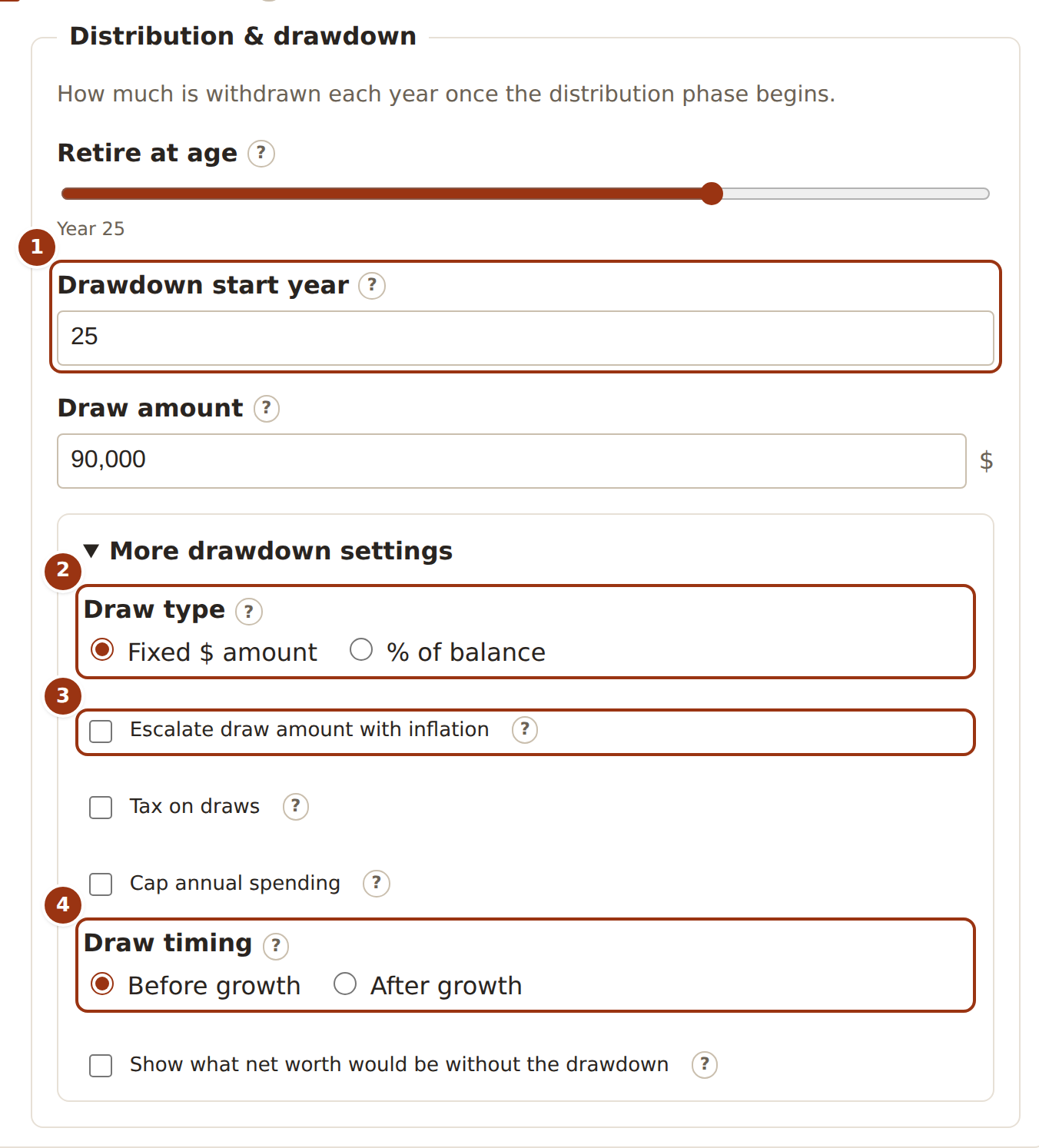
- The year drawdown begins; the slider and the field set the same thing.
- Draw type: a fixed dollar amount each year, or a percentage of whatever the balance is.
- For a fixed amount, optionally raise it each year by an inflation rate, from the second drawdown year.
- Draw timing: take the year’s withdrawal before that year’s growth is applied, or after it.
Housing
How is a home and mortgage modelled?
A home is an appreciating asset projected next to the portfolio, not inside it. You give it a current value and an annual appreciation rate (which may be negative), and optionally a mortgage — outstanding principal, interest rate, months remaining, and any extra principal you pay each month, which shortens the term rather than the payment — plus annual property tax, insurance and upkeep. The value appreciates once a year, the mortgage amortizes month by month, and the difference between value and remaining principal is equity. Tax, insurance and upkeep rise each year at your inflation rate, if you set one.
Equity counts toward net worth but never toward the investable balance, so the results show both, and you can exclude a home from net worth altogether (a house you mean to leave to your children) while still projecting its costs. Those costs are assumed to be paid from a paycheck the calculator does not model until a year you choose — typically retirement — from which they are withdrawn from the portfolio instead, taxed like any other withdrawal. Home appreciation does not move with the Bear/Base/Bull rates; the Bear case therefore understates housing risk, and the way to see a downturn is a lower appreciation rate.
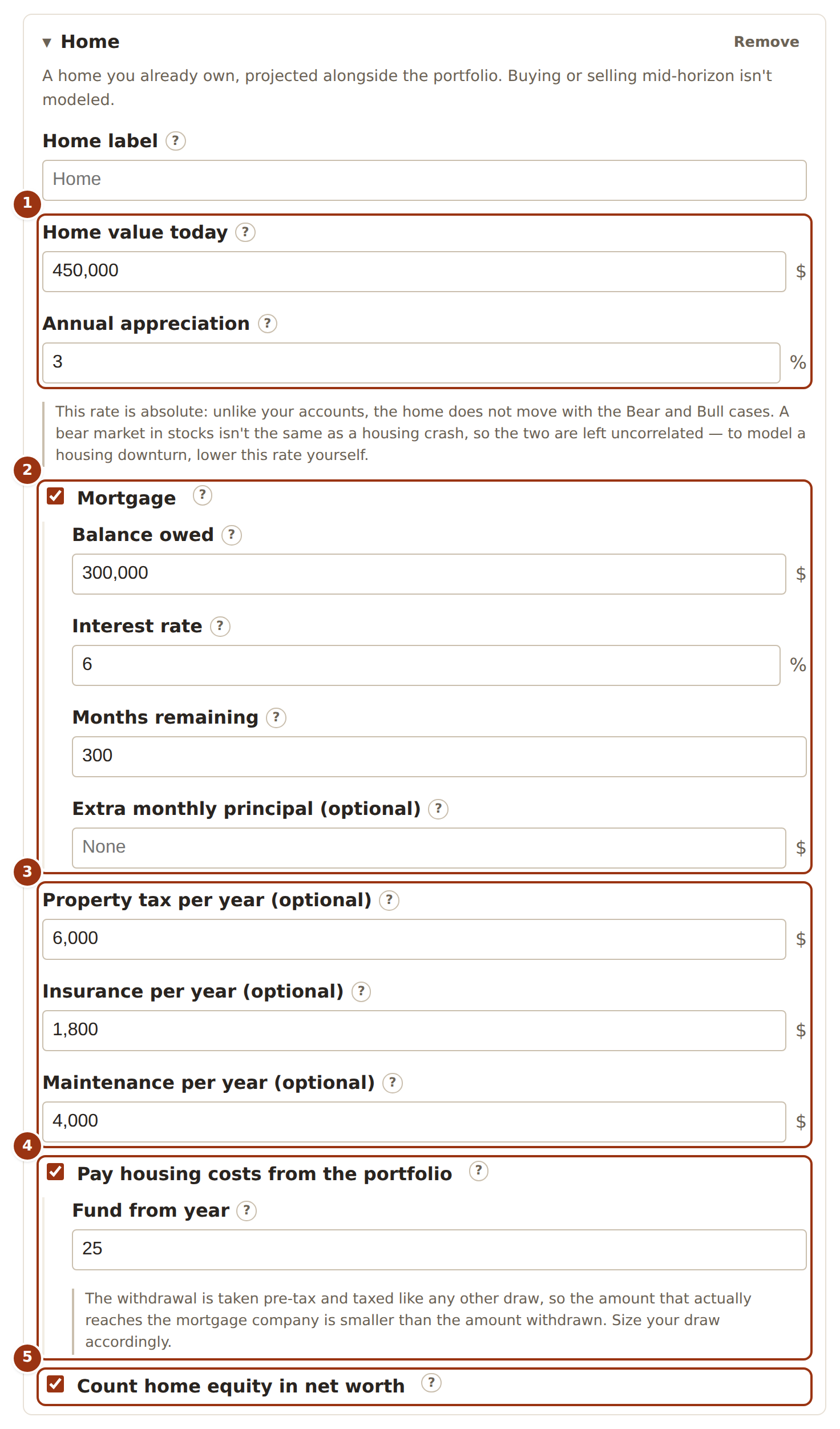
- The home’s value today and the rate it appreciates at — fixed, not swept with Bear and Bull.
- The mortgage, amortized month by month. Extra principal shortens the term rather than the payment.
- Carrying costs — property tax, insurance, upkeep — each rising with your inflation rate if you set one.
- From this year on, the payment and carrying costs are withdrawn from the portfolio and taxed like any other draw. Before it they are assumed paid from income.
- Whether the equity counts toward net worth. Either way it never counts toward the investable balance.

- With a home that counts, the chart can show either the investable balance or total net worth; they differ by exactly the home equity in every year.
Privacy and data
Is my data sent anywhere?
No. The calculator is a static page that runs entirely in your browser: there is no account, no server that receives your inputs, and no analytics script recording what you type. The only network requests the page makes are to load itself. If you share a forecast as a link, the inputs travel in the link itself, to whoever you send it to and nowhere else.

- The reminder in the header on every screen: your inputs stay in this tab.
Is my data saved?
Not unless you ask. By default everything lives in the open tab, and reloading or closing it starts you over. The Scenarios screen has an opt-in switch to save your named scenarios in this browser’s own storage on this device; it is off until you turn it on, turning it off deletes what was saved, and even then the scenario you are currently editing is not stored — only the saved list is.
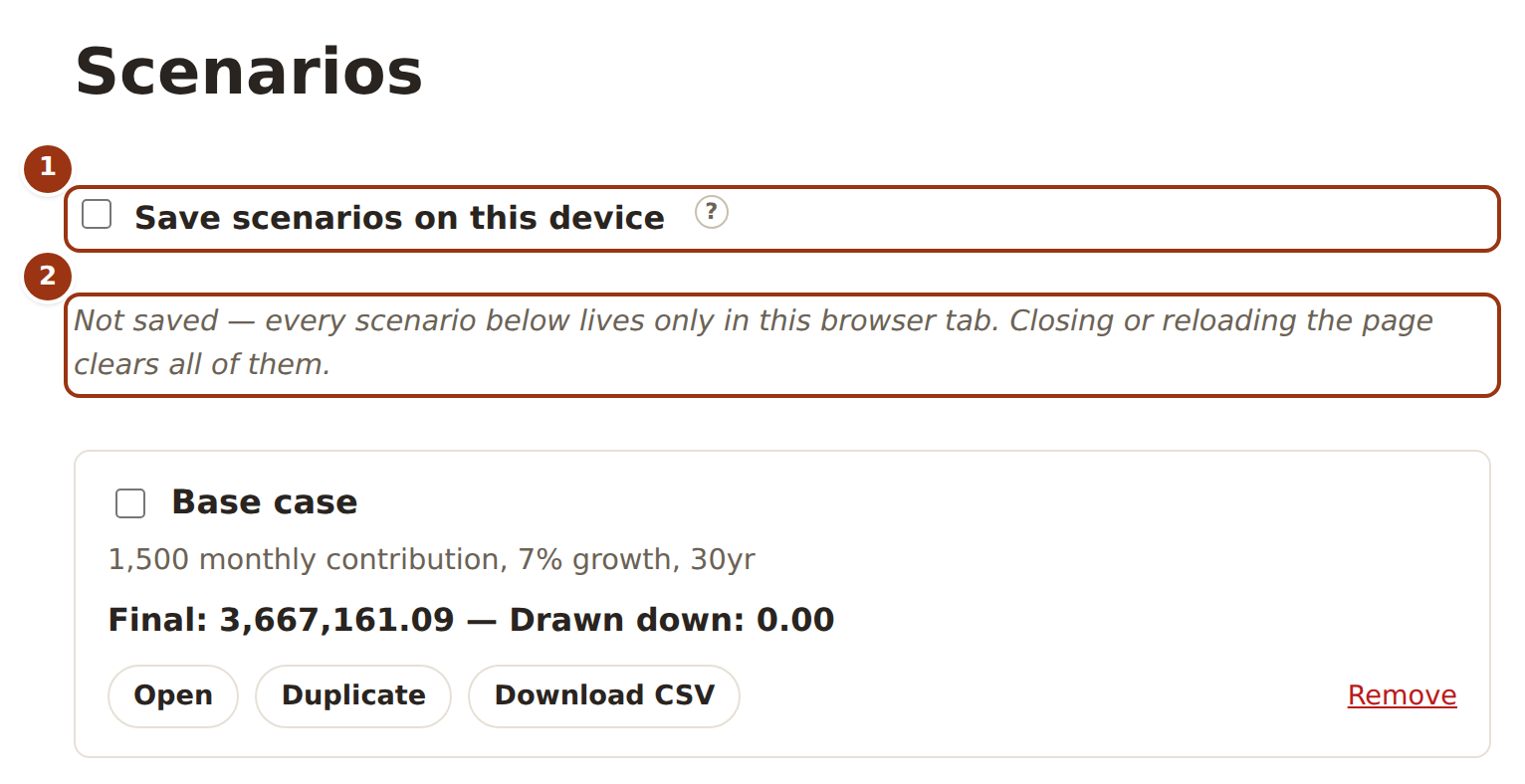
- The one switch that writes anything to this browser’s storage. Off by default; turning it off again deletes what was saved.
- The status line says which of the two states you are in.
Does it work offline?
Yes. After the first visit the page installs a small service worker that keeps a copy of the app’s own files in your browser, so it opens and computes with no connection, and it can be installed to your home screen like an app. The worker caches only the app itself, never your scenarios or anything you type.
Limits
What is this calculator not?
It is not financial advice, and nothing here knows your situation. It is not a tax planner: one flat rate on withdrawals, as described above, is the entire tax model. It is not probabilistic: every scenario is a constant growth rate applied every year, so there is no Monte Carlo simulation, no sequence-of-returns risk, and no “chance of success” figure. It does not model Social Security or any pension, healthcare costs, or a salary against living expenses; contributions are what you tell it you save, not what is left over. It does not model buying or selling a home mid-horizon.
What it is good at is arithmetic you can check: exact, repeatable year-by-year projections for the assumptions you give it, with every input visible and every number traceable to the schedule.
Still wondering?
The quickest answer is usually to try it: every result updates as you type, and nothing you enter leaves your browser.